NyxBoostDownload

← All updates

NyxBoost 0.30.3

What's new in 0.30.3

Free tools for games, the network and mouse pointers, clearer confirmations and a window that puts less load on your PC.

  • A crosshair over your gameFree

    Dot, cross or ring: 10 ready ones and your own. For games in windowed or borderless mode.

  • Your own game in the libraryFree

    From running programs or by its .exe, and it shows up at once in My games, Crosshair and FPS Lab.

  • Latency under loadFree

    Shows when the ping jumps, while downloading or uploading, and what to do about it.

  • Pointers for all of WindowsFree

    13 full schemes, black and white versions, sizes from 70 to 400 %.

A summary instead of a technical list

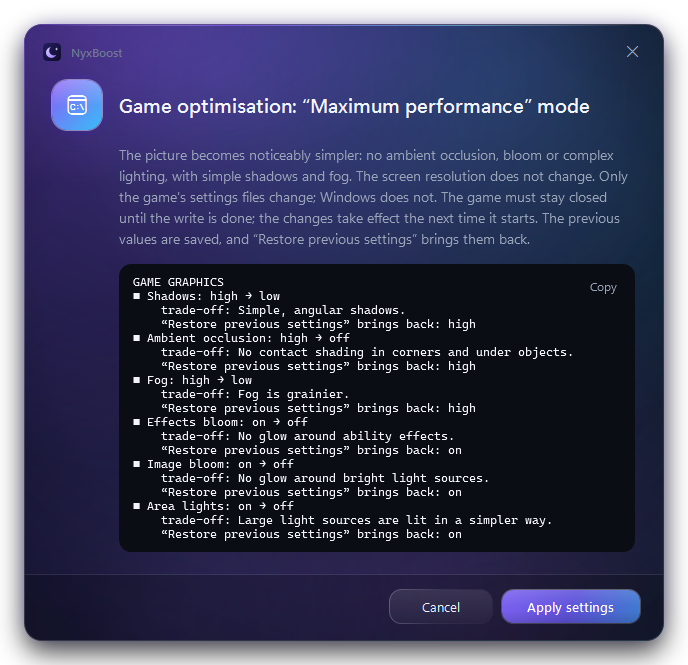
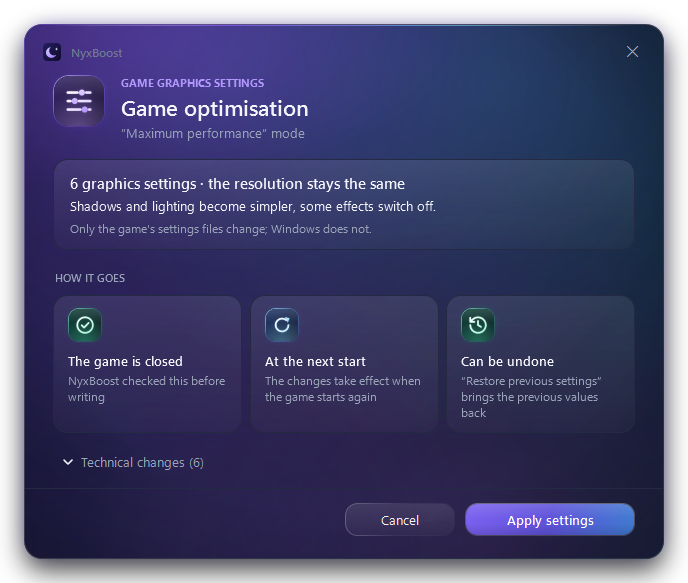
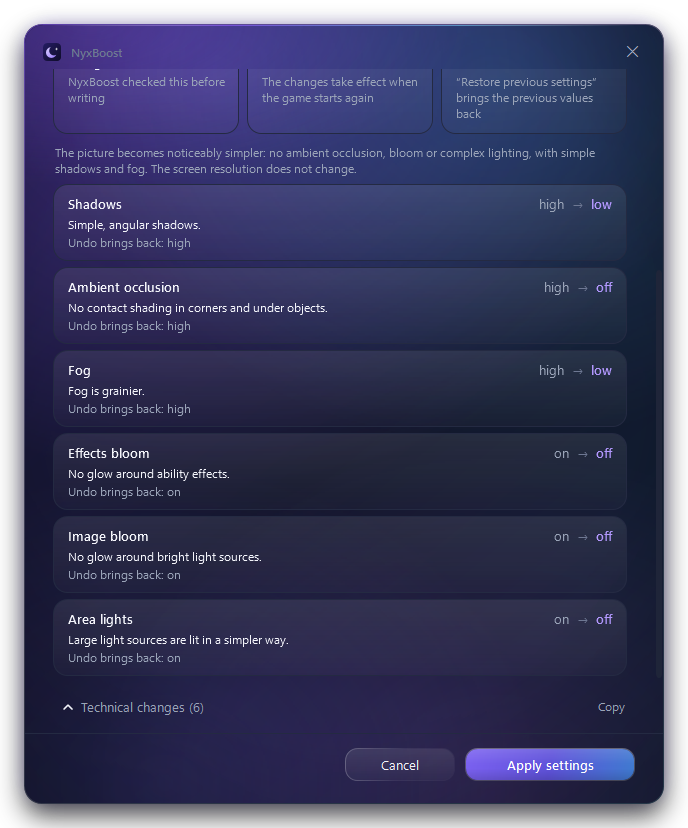
Before changing a game's graphics settings, NyxBoost tells you the essentials: how many settings change, what gets simpler and whether the resolution stays. The details of each setting are one click away.

First the summary and three conditions: the game is closed, the changes apply at the next start, everything can be undone. Cancel and Apply are always visible.

The confirmation window in a test build: a long technical list of changesThe confirmation window in 0.30.3: a summary, three conditions and the technical changes foldedThe confirmation window in 0.30.3 with the technical changes unfolded
Open the screenshot at full size
Real screenshots of the window at the same scale, 100 %.

New6

Crosshair over the gameFree

A separate transparent window over the game: nothing is injected into it. In exclusive full screen the crosshair may not be visible.

GamingCrosshair

Add a game by handFree

If Steam finds the same game later, it stays one entry.

GamingMy gamesAdd a game

Latency under loadFree

Three phases: idle, downloading and uploading. Runs only on a button, about 21 seconds and up to 250 MB; network settings are not changed.

NetworkConnection check

Pointers for all of WindowsFree

Your previous scheme and size come back with one button and when NyxBoost is uninstalled.

PersonalizationCursors

Automatic mode for every gameFree

One setting for the detected games, no profile for each: while you play, only what you ticked is turned on.

GamingAutomatic mode

TRIM check for SSDsFree

Shows up only if TRIM is off on the system SSD; undo brings the previous value back.

OptimizationRecommendations

Improved9

  • Clear confirmation of game settings

    A summary and conditions instead of a technical list; the details are under Technical changes.

  • Games in three tabs

    Prepare Windows, Automatic mode and My games, each with its own job.

  • A faster tray

    Starting NyxBoost again opens the window at once; the icon is sharp at 150 % and comes back after Explorer restarts.

  • An inactive window barely uses the CPU

    Background animations stop completely while the window is minimized or in the background.

  • A lighter NyxBoost

    No debugger parts and no WinForms; .NET texts only in the interface languages.

  • NyxBoost's live wallpaper rests during games

    Even if the game mode changed nothing. NyxBoost does not pause or freeze other wallpaper apps.

  • Narrator

    Names about 80 buttons and switches that used to sound like just “button”.

  • Premium without a restart

    After a key, a purchase, signing in or out, pages and locks update by themselves, on the same tab. The account card has Refresh status.

  • A more reliable FPS Lab

    Records the game's own process and compares only runs in the same conditions.

Pointers on different backgrounds

Real pointers from 0.30.3: the arrow, the hand and the text cursor. Every scheme comes in black and white: switch the background and see which reads better.

PersonalizationCursors

Classic
The arrow, hand and text cursor of the scheme «Classic», BlackBlackThe arrow, hand and text cursor of the scheme «Classic», WhiteWhite
Contrast
The arrow, hand and text cursor of the scheme «Contrast», BlackBlackThe arrow, hand and text cursor of the scheme «Contrast», WhiteWhite
Highlight
The arrow, hand and text cursor of the scheme «Highlight», BlackBlackThe arrow, hand and text cursor of the scheme «Highlight», WhiteWhite
Neon
The arrow, hand and text cursor of the scheme «Neon», BlackBlackThe arrow, hand and text cursor of the scheme «Neon», WhiteWhite
Orbit
The arrow, hand and text cursor of the scheme «Orbit», BlackBlackThe arrow, hand and text cursor of the scheme «Orbit», WhiteWhite
Blade
The arrow, hand and text cursor of the scheme «Blade», BlackBlackThe arrow, hand and text cursor of the scheme «Blade», WhiteWhite

On this page the pointers are shown 1.5 times the standard Windows size. 7 more schemes and the arrow-only looks are in the app.

Fixed9

  • The cart's result matches its rows: “Done: N of M”.
  • Cleanup shows what was removed and what was skipped the same way everywhere.
  • Frame recording stops if the game closes during a measurement.
  • A game profile does not change the power plan you chose, and on battery the plan is not switched.
  • Applying again keeps the original values and your own choice.
  • Setting and service lists show the real state; a service's delayed start comes back.
  • Startup sees shortcuts turned off in Task Manager.
  • Installing over a newer version changes nothing and says so plainly.
  • Live wallpaper in Fill mode is cropped the way Windows crops wallpaper.

Measurements

Installed folder
0.30.2 → 0.30.3, 468 → 281 files−24%
CPU, open inactive window
CPU time per second−84%
CPU after opening from the tray
In the first 15 seconds−21%

The folder: in a virtual machine after a quiet update from 0.30.2. The CPU: on one PC, Release build, three alternating runs.

All changes in 0.30.3

In short, as in the app's What's new window.

  • Games in three tabs: Prepare Windows is a one-off check of the PC for all games, with confirmation and undo; Automatic mode is now free — one setting for detected games (the High performance plan while you play, only if you tick it, and the pause of NyxBoost's live wallpaper); My games holds the library, supported games' settings and FPS Lab.
  • A crosshair over your game (free): dot, cross or ring, 10 ready ones and your own presets. It is a separate transparent NyxBoost window: nothing goes into the game. In exclusive full screen it may not be visible — pick Borderless or Windowed fullscreen in the game.
  • Add your own game by hand — from running programs or by choosing its .exe. It shows up at once in My games, Crosshair and FPS Lab; if Steam finds it later, there is still one entry.
  • Deadlock and Dota 2 graphics settings from the games' checked presets, with a clear confirmation: a summary, the conditions and a folded Technical changes list. Applied only while the game is closed, and everything can be undone.
  • Check latency under load (free): idle, while downloading and while uploading — in which phase the spikes appear and what to do. Runs only when you press the button, about 21 seconds and up to 250 MB; no network setting is changed.
  • Pointers for all of Windows (free): 13 full schemes and three arrow-only looks, black and white, from 70 to 400 %. Your previous scheme and size come back with one button and when NyxBoost is uninstalled.
  • A new Personalization section with two pages: Wallpaper and Cursors.
  • Live wallpaper rests while you play even when the game mode changed nothing, and plays again once no game or other reason to pause is left. Other wallpaper apps are never paused or frozen by NyxBoost.
  • Tray: starting NyxBoost again opens the window at once; a window closed to the tray is let go together with program icons and game covers; the icon is sharp at any scale and comes back after Explorer restarts.
  • A lighter NyxBoost: after updating from 0.30.2 the installed folder is about 43 MB smaller (178.6 → 135.5 MB, measured in a virtual machine); among other things, .NET texts only in the interface languages, no debugger parts and no WinForms.
  • Honest results: the cart summary matches its rows, FPS Lab compares only comparable series, the settings and services lists show the real state, and applying again never loses the original values.
  • A TRIM check for SSDs in Recommendations — only when it is off on the system SSD; undo brings the previous value back.
  • Premium turns on and off without a restart: after a key, a purchase, signing in or out, pages and buttons update by themselves. After buying in the browser the status is checked when you come back to NyxBoost; the account card has Refresh status.